Thalverion 0.9.9613 languages · 15 countries

The self-reliance system
that keeps your household ready,
even without internet.

Why Thalverion

One application. Not ten.

Preparedness apps split everything up: one for the list, one for maps, one for radio, one for documents. Thalverion brings them together, with your country's official recommendations and quantities calculated for your household.

  1. 01

    Offline first.

    Lists, guides, maps, encyclopedias, official guides, product and medicine databases, latest forecasts: everything is stored on the device. The internet is only used for updates.

  2. 02

    Your data stays at home.

    No telemetry, no mandatory online account. Important documents are kept in an encrypted vault. Backups go to a USB stick.

  3. 03

    A real crisis, really managed.

    Declare a situation (or let Thalverion do it on a red warning or a power cut): instructions, status of each member, time-stamped log and final report.

  4. 04

    13 languages, 15 countries.

    National weather and alert sources, emergency numbers, public radio, radio rules and official guides specific to each country. Language and country are set separately.

First start

Ready in 10 minutes.

A guide walks you through the first launch. Each step can be skipped and resumed later; everything works by touch or keyboard.

  1. Minute 0

    Country and language

    The country sets the official sources; the language is suggested according to the country, never imposed.

  2. Minute 2

    Your town

    For weather, warnings, risks at your address and the nearest useful places.

  3. Minute 5

    Your household

    Adults, children, babies, pets, vehicles: kit quantities are calculated automatically.

  4. Minute 10

    “62% ready”

    Your first score, what limits you most and the three priority actions.

Thalverion on a computer

The desktop version · 1/4

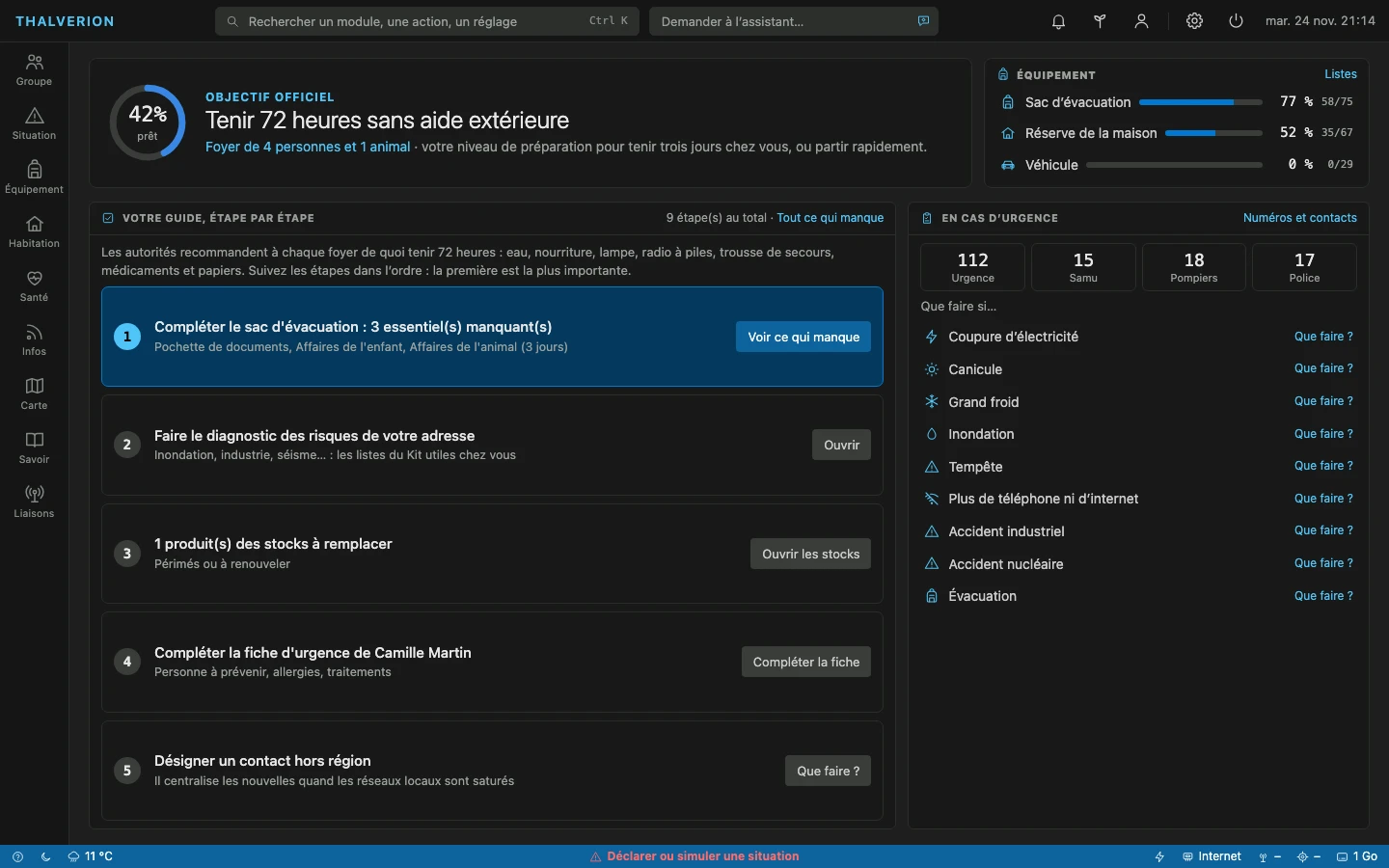
A clear structure.

Modules on the left, universal search at the top (Ctrl K) and, in the centre, your step-by-step guide. Here, a sample household: 42% ready to last 72 hours.
The desktop version · 2/4

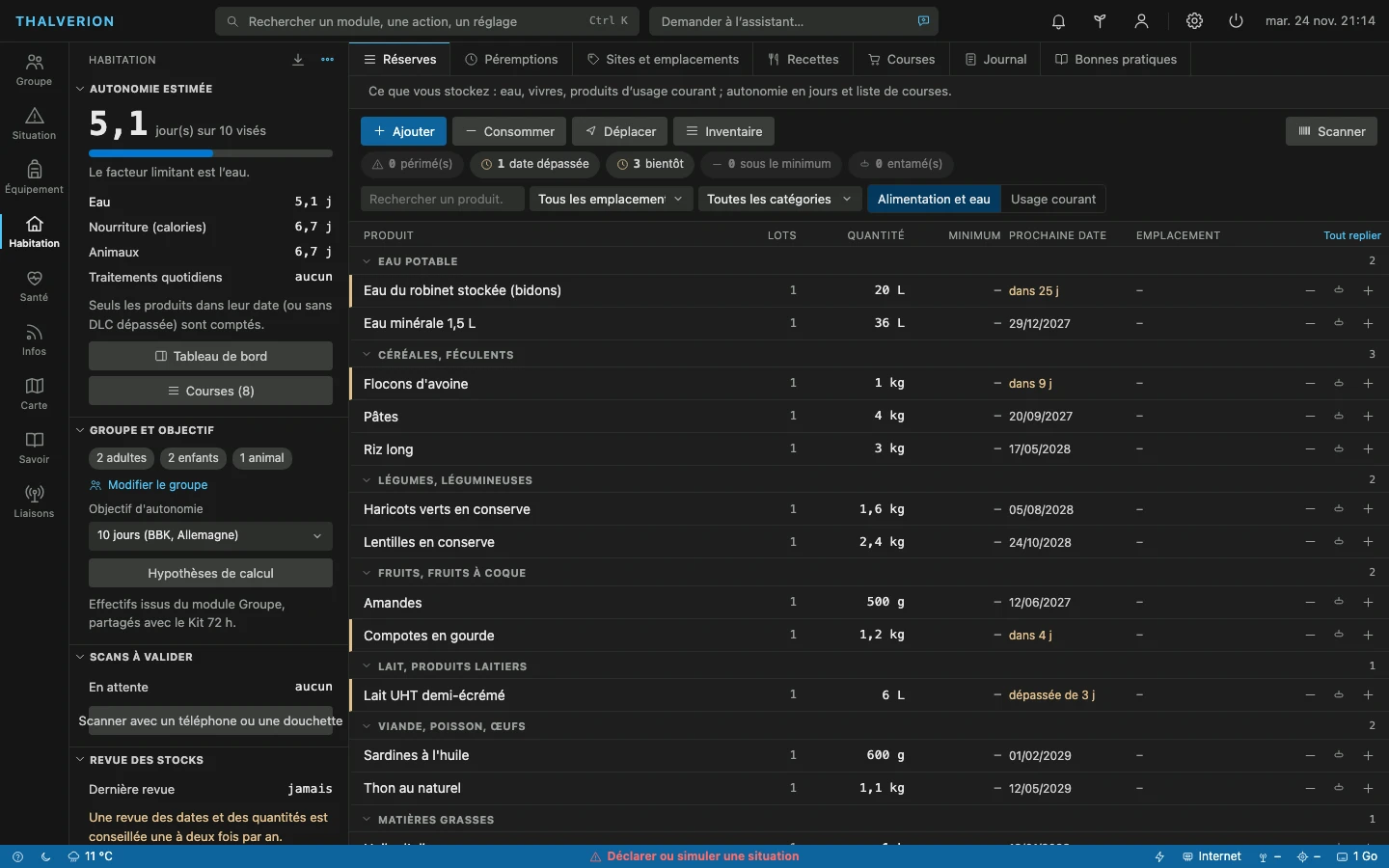
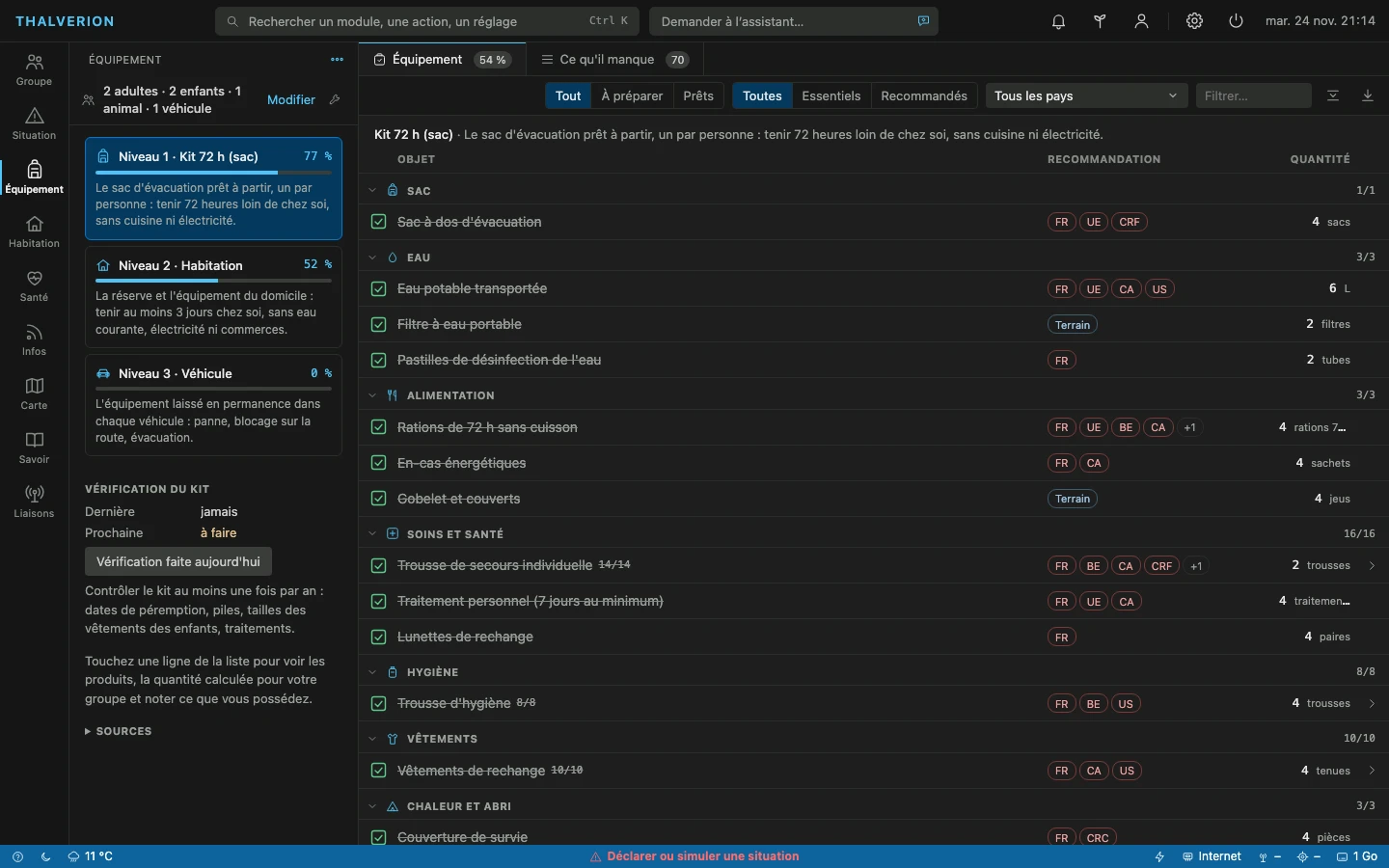
The kit, item by item.

Each item carries its official source (France, European Union, Red Cross…) and a quantity calculated for the household: here 2 adults, 2 children, 1 pet and 1 vehicle.

The desktop version · 3/4

Self-reliance, in days.

Supplies by batch and by date, converted into days of water and food. The factor that limits the household is highlighted: here, water.

The desktop version · 4/4

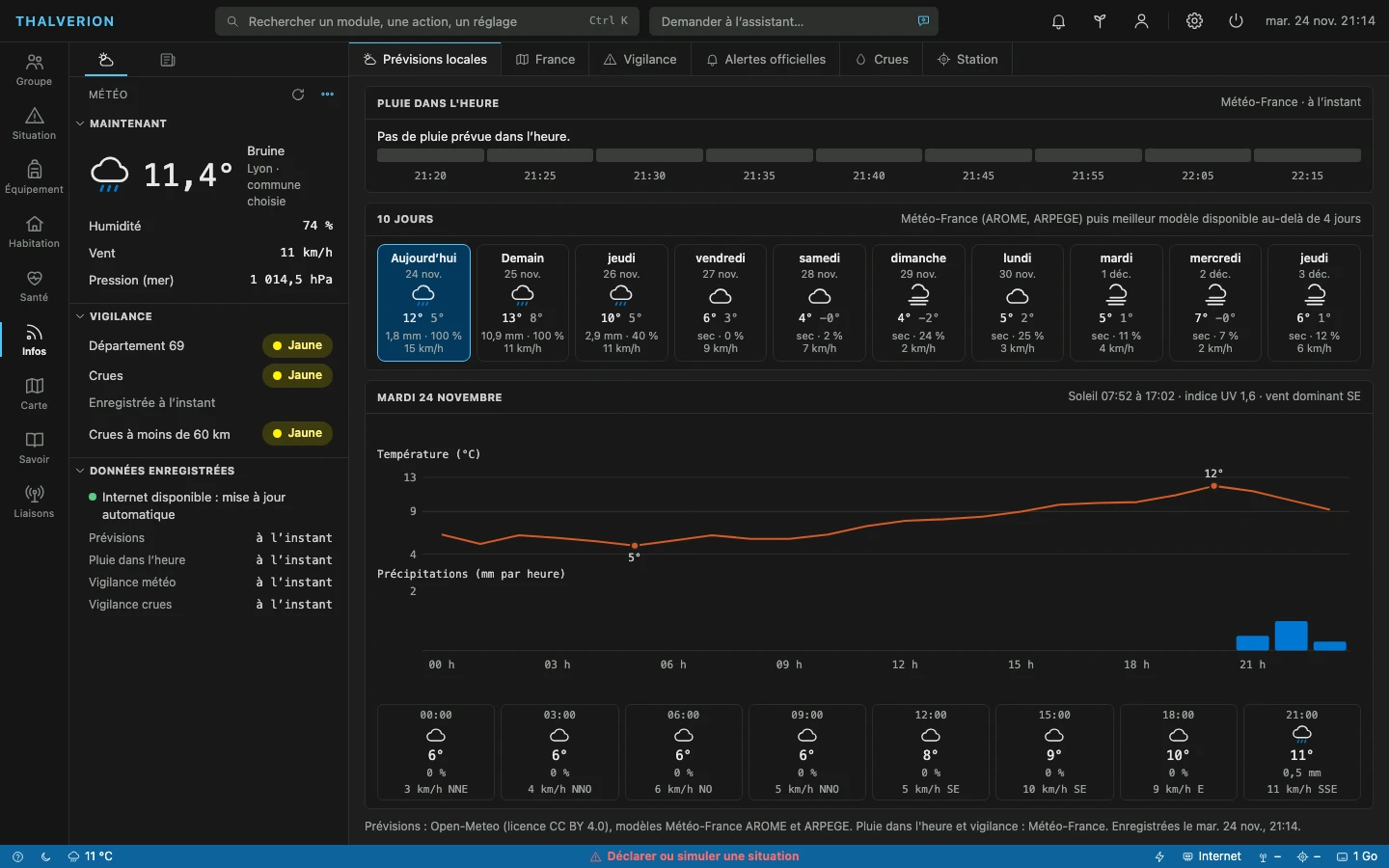
Weather and official warnings.

10-day forecast, rain in the next hour, regional warnings and floods. The latest data remains available without internet.
All features

Before, during, after.

Here is everything Thalverion does, module by module. Three display levels (beginner, intermediate, expert) and three circles of modules let you start simple and go further at your own pace.

Guided first aid

The red button.

A full-screen page available without signing in, from Situation, Health or search. It respects red night mode and touch mode.

  • Six guides: cardiac arrest, recovery position, bleeding, choking, burns, feeling faint. For each one: when to use it, the steps, points to watch, children and infants.
  • CPR metronome: 100 to 120 compressions per minute, sound, vibration, counter to 30.
  • Call emergency services in one tap (your country's number, 112 by default) and the nearest defibrillator on the map.
  • Citizen first-responder apps and training courses in your country.
  • Source cited on every guide: the French national “citizen first aid” reference. Official reference documents are downloaded into the library and cannot be deleted.
Equipment

72-hour kit, home, vehicle.

A reference catalogue of about 157 items, each linked to its official source (France, EU, Red Cross, Belgium, Canada…).

  • Three levels: individual evacuation bag (65 items), family shelter-in-place supplies (63), vehicle add-on (29).
  • Calculated quantities according to adults, children, babies, pets and vehicles; first-aid kits detailed item by item.
  • Priority of each item (essential, recommended, convenient) and technical description.
  • Tracking: owned, quantity, expiry dates, notes; yearly check with reminder.
  • “What is missing” and an exportable shopping list.
Even more
  • Preparation by type of crisis: power cut, heatwave, flood, storm, industrial or nuclear accident.
  • Adapted to the country: local obligations (high-visibility vest, smoke detectors), emergency numbers, alert system.
  • “Risk at your address” badge on the relevant lists.
Home

Supplies and expiry dates.

Real stock management, designed for self-reliance: how many days can you last with what you have?

  • Self-reliance dashboard: days covered by water, calories and medication, target (for example 10 days), projection at 1, 3, 6 and 12 months.
  • Coverage by food group compared with recommended quantities.
  • Inventory by dated batches, “first in, first out”, opened products used first, waste tracking.
  • Expiry dates sorted by urgency, with alerts.
  • 34 durable household items with their condition and technical reference points.
Even more
  • Several sites (second home, workplace, vehicle), each with its own self-reliance, and an overall view.
  • Locations (boxes, cupboards, trunk) and printable QR labels: once scanned, they open the contents of the box.
  • 13 offline product databases (Open Food Facts, about 2.6 million products), updated daily.
  • Entry by barcode: USB scanner (any 2D reader seen as a keyboard, for example Zebra DS2208 or Netum), the phone's camera, or scans made without internet and confirmed later.
Health

The medicine cabinet.

All the household's medicines, who takes what, and how many days of treatment are left.

  • Medicine assigned to a member, prescribed dosage, days of treatment in reserve, batch and expiry date.
  • Box scanning (DataMatrix code) with the camera or a scanner; photo of the prescription kept with the medicine.
  • Offline public medicines database (France), official leaflets and summaries, updated monthly.
  • Treatments count in the self-reliance calculation and appear on the group's health records.
Situation

Manage the crisis. Or practise for it.

Before, during, after: a single module, from the “to do before” list to the final report.

  • “What to do in case of…”: official instructions by type of crisis and risks at your address.
  • Declared by hand, or automatically: red warning in your area, official alert, switch to battery power.
  • During: elapsed time, instructions to tick off, status of each member (safe, needs help, no news), time-stamped log, notes.
  • Closing: final report (timeline, instructions completed, status of members).
Drill mode
  • 24-hour power cut, timed evacuation (target 15 min) or shelter-in-place (10 min, then 2 h).
  • “Drill” banner distinct from a real situation; no alert channel is used. A real alert interrupts the drill.
  • Report with the weak points; calendar of national drills (siren tests, Warntag, NL-Alert…).
Weather and alerts

Official sources, where you live.

10-day and hour-by-hour forecasts with your country's national model (Météo-France, DWD, Met Office, KNMI…).

  • Official warnings at your exact location: Météo-France, DWD, Met Office, and MeteoAlarm for 10 other countries; history of colour changes.
  • Floods: Vigicrues, PEGELONLINE, Environment Agency, with a map layer.
  • Civil protection alerts (industrial accident, drinking water, shelter-in-place, evacuation): NINA, Alertswiss, BE-Alert, VMA. Your location is never sent.
  • Rain in the next hour (France), national warning map.
Even more
  • Optional local weather station, with the appropriate device (Ecowitt station and its GW1100 or GW2000 gateway, or 433 MHz sensors picked up by an RTL-SDR dongle), and a barometric forecast that works without internet.
  • The latest data remains available offline, with its date.
  • “Enable alerts on your phone” page for your country.
Notifications and risks

Warned in time, everywhere.

The events that matter reach the right person, through the right channel, even without internet.

  • Orange or red warning, flood, declared situation, member in difficulty, SOS received by radio, power cut.
  • Daily summary: upcoming expiry dates, equipment maintenance, kit check.
  • Channels: notification centre, SimpleX (reply “1” safe, “2” need help), Meshtastic on a private channel (with a LoRa module), web notifications.
  • Quiet hours adjustable per member; no health data in a notification.
  • Home risk assessment (Géorisques in France), run only at your request, available offline.
Group

The whole family, organised.

People and pets, with what emergency services need to know.

  • Health record per member: blood group, allergies, treatments, contacts; printable emergency sheet.
  • Contacts by category, priority contacts, clickable phone numbers.
  • Meeting points on the map, with location QR codes.
  • Instructions to tick off (take shelter, turn off the gas, listen to the radio), logbook, free notes.
  • Administrator, Member and Guest (read-only) accounts.
Vault

Your documents, encrypted.

Copies of identity documents, prescriptions, insurance policies, bank documents: safe, even if the device is stolen.

  • AES-256 encryption with integrity check; key protected by your passphrase and by a recovery key.
  • Automatic lock after 10 minutes of inactivity.
  • List of documents to gather, with expiry dates and reminders.
Digital bag and paper binder

The essentials in your pocket. And on paper.

If you have to leave without the main device, or if nothing powers on any more, you keep the essentials.

  • Digital bag: a read-only copy on the phone, available in airplane mode, far from home.
  • Emergency sheets, contacts, meeting points, national numbers, instructions, frequency plan, bag list.
  • Map extract around the home and the meeting points.
  • Vault documents chosen one by one, encrypted by the phone with a passphrase that never leaves it.
  • Emergency paper binder: a single A4 PDF to print.
  • It contains the family plan, emergency sheets, contacts, instructions by situation, meeting points with QR codes, the radio frequency plan and the kit summary.
Map

Find your way without a network.

OpenStreetMap vector maps downloaded by area: world, country, region, district.

  • Offline routing on foot, by bike and by car.
  • “The nearest” without internet: defibrillator, reception centre, meeting point, shelter, with distance, direction and walking route.
  • Official places: defibrillators, Seveso sites, nuclear power plants and their zones, floods, public shelters.
  • Personal places, GPX import and export; GPS position and members of the Mesh radio network with the appropriate devices.
  • Coordinates in degrees, decimal or Maidenhead.
Knowledge base

Wikipedia in your living room.

Offline encyclopedias (Wikipedia, WikiMed…) and each country's official preparedness guides.

  • Catalogue of packs by language and by topic.
  • Government brochures in PDF (France, Germany, Sweden, Norway, Netherlands…).
  • Personal library: add your PDFs and EPUBs, built-in reader, reading progress.
  • Twelve topics (water, food, medical, shelter, energy, plants…), full-text search, favourites.
Local AI assistant

Ask the question. Even offline.

A question in everyday language, an answer drawn from your library, with its sources cited.

  • Works without internet using the encyclopedias and the Thalverion knowledge base.
  • When the internet is available and you allow it: large free online models, without an account.
  • Offline translation (French, English, Spanish).
  • “Ask the assistant” field always visible at the top; conversation history.
News

The essentials, without the noise.

Verified national feeds according to your country and language, international sources and “crises and disasters”.

  • Alert words by language: storm, flood, shortage, cyberattack… flagged at the top.
  • Articles saved for offline reading.
Energy

Every watt counts.

Battery, inverter, solar panels: everything is measured, and the remaining runtime estimated.

  • UPS units and battery gauges, Victron solar equipment (controller, vehicle charger, shunt).
  • Source management: solar first, vehicle as backup.
  • Consumption, production, balance, history, power-saving mode.
  • Clean automatic shutdown before the battery is empty (can be cancelled).

Devices required: measuring equipment connected to the computer (Victron SmartSolar solar controller or Victron SmartShunt battery monitor, with the VE.Direct to USB cable).

Network and sharing

Home Wi-Fi, even without a router.

Your computer shares Thalverion with the phones in the house: they connect with a simple QR code.

  • 2.4 or 5 GHz Wi-Fi access point, welcome portal, optional sharing of the internet connection.
  • Secure connection for phones (local HTTPS) with a certificate specific to your installation, verifiable by fingerprint.
  • Sharing with the phones in the house from the desktop application.
  • GPS shared by all modules (weather, map, Mesh, radio), with a USB GPS receiver (GlobalSat BU-353N5, or a u-blox-based model such as the VK-162).
System

Robust, repairable, yours.

Everything that makes Thalverion something you can rely on the day you need it.

  • Full backup to a USB stick, optionally encrypted, verified, restorable on another device.
  • Offline update by USB stick, with automatic rollback to the previous version if it fails.
  • Equipment: inventory of survival and radio gear, maintenance tracking, automatic detection of connected devices.
  • Capability review: 10 points (offline, energy, maps, radio, Mesh…) with a suggestion for each gap.
  • Accounts, sessions and activity log; data restricted by role.
  • Exported files (GPX, PDF, WAV, CSV) can be copied to a USB stick.
  • Red night mode that preserves night vision, touch mode with large targets, dedicated phone version.
  • Built-in help, accessibility (contrast, keyboard, screen readers), confirmation before any deletion.
  • Optional shop, which can be turned off entirely: no personal data is used to suggest a product.
Communication

Eight ways to reach each other.

From encrypted email to amateur radio, by way of the LoRa radio network between neighbours. Radio features require the appropriate devices: the details and models recognised by Linux are just below.

Tuta MailSimpleXMeshtastic LoRaFM / DAB+OpenWebRX+CB · PMR446 · VHFMorseAPRS · Winlink · JS8Call

See the communication ladder

Communication

When one network goes down, the next takes over.

Thalverion organises communication in successive steps. The higher you climb, the less you depend on infrastructure: on the last step, only the radio and your batteries remain.

Step 1

Internet

Tuta encrypted email, SimpleX messaging without a phone number.

Step 2

Home network

SimpleX and notifications between the phones in the house, without a router or internet.

Step 3

LoRa Mesh

Messages and positions over several kilometres, without a network or a phone.

Step 4

Licence-free radio

CB 27 MHz, PMR446, marine VHF; emergency channels and the group's radio schedules.

Step 5

Amateur radio

APRS, Winlink radio email, JS8Call, Morse: the message gets through, whatever happens.

The appropriate devices are required. Email and messaging work on any computer. Radio, the LoRa network and GPS each need a USB device: the table lists, for each feature, common models recognised by Linux.

Details of the communication features
FeatureWhat it doesDevice requiredWithout a network
Encrypted emailThe official Tuta Mail client, served by the device, in Thalverion's colours; help with creating an account.noneno
SimpleX messagingEncrypted messages between relatives without a phone number, over the internet or local Wi-Fi; invitations by QR code.nonelocal network
Mesh LoRaMeshtastic: messages and positions between members, nodes, channels, positions on the map.USB LoRa module (Heltec V3, LILYGO T-Beam, RAK WisBlock)yes
FM and DAB+ radioListening, scanning, favourites, transmitter database, public radio to listen to in a crisis.USB radio dongle (RTL-SDR Blog V4, Nooelec NESDR SMArt)yes
All-band receiverOpenWebRX+: shortwave, aviation, marine, amateur radio; favourite frequencies.the same USB radio dongleyes
TransmittersEmergency channels (CB 9, VHF 16…), each country's rules (licence, power), inventory of your radios, radio schedules.your CB or PMR446 radios (independent of the computer)yes
MorseText ↔ Morse conversion, audio decoding, scheduled transmissions, log.none; a radio to transmityes
DigitalAPRS receive and transmit, Winlink radio email, JS8Call.amateur radio transceiver, USB audio interface (Digirig Mobile, SignaLink USB) and licenceyes
Without internet

What works when everything is cut off.

Most features never need the internet. The others keep their latest data, with its date.

YesKit, supplies, group, vaultSituation, drills, PDF binder
YesGuided first aidGuides, metronome, reference documents
YesMaps and routingDownloaded areas, “the nearest”
YesEncyclopedias and libraryFull-text search
YesAI assistantAnswers drawn from the library, translation
YesProduct and medicine databasesBarcodes included
YesDigital bagOn the phone, in airplane mode
YesRadio, Mesh, Morse, APRSWith the appropriate devices
Latest dataWeather, warnings, alertsLocal forecast with a weather station
Local networkSimpleX messagingBetween the devices in the house
NoTuta email, newsSaved articles remain readable
NoData updatesOr by USB stick
0

reference items in the kit, each with its official source

0 M

products in the offline databases, readable by barcode

0

interface languages, from Ukrainian to Finnish

0

countries with their alert sources, numbers and radio rules

Download

Choose your device.

Thalverion is installed on your computer, with a companion app for the phone. Always check the file's fingerprint before installing it.

Available

Windows

PC running Windows 10 or 11, 64-bit (Intel or AMD processor). First release for Windows.

Version
—
Size
—
Format
Installer (.exe)
SHA-256
—
  1. Download the installer and run it.
  2. Windows shows “Windows protected your PC”: click “More info”, then “Run anyway”.
  3. Open Thalverion from the Start menu.
Available

macOS

Mac with Apple silicon (M1 or later). First release for macOS.

Version
—
Size
—
Format
Disk image (.dmg)
SHA-256
—
  1. Download the disk image, open it and drag Thalverion into Applications.
  2. On first launch, macOS refuses to open the app: go to System Settings, Privacy & Security, then click “Open Anyway”.
  3. Launch Thalverion again.
Available

Linux · Intel / AMD

PC with a 64-bit Intel or AMD processor (Debian, Ubuntu). The most common case.

Version
—
Size
—
Format
.deb package (amd64)
SHA-256
—
  1. Download the package.
  2. Install it: sudo apt install ./Thalverion_*.deb
  3. Open Thalverion from the applications menu.
Available

Linux · ARM

Computer with a 64-bit ARM processor (Debian, Ubuntu). Maps, encyclopedias, routing and assistant included.

Version
—
Size
—
Format
.deb package (arm64)
SHA-256
—
  1. Download the package.
  2. Install it: sudo apt install ./Thalverion_*.deb
  3. Open Thalverion from the applications menu.
Coming soon

Android

The companion app: it connects to the household's Thalverion through its QR code and checks its certificate by itself.

Upcoming

What's next

Versions for other systems are in preparation. In the meantime, any phone can open Thalverion in its browser, on the home Wi-Fi.

Intel MaciPhoneGoogle Play
Online trial

Try it first

Explore Thalverion with a sample household, the Martin family in Lyon, right in your browser.

Our principles

Three rules, no exceptions.

They guide every feature added to Thalverion.

Rule 01

Sourced.

Every recommendation cites its official source. Nothing is made up, nothing is exaggerated.

Rule 02

Private.

No telemetry. Your data stays on your device, and anything sensitive is encrypted.

Rule 03

Simple.

A beginner finds their way in ten minutes. An expert finds their radio and their Morse.

Questions

Good to know.

Straight answers, including about what Thalverion does not do yet.

Which devices are needed?

None for the essentials: preparation, supplies, health, group, maps, encyclopedias, assistant, weather and messaging work on the computer alone. Some features require an appropriate device, plugged in by USB. A few common models recognised by Linux:

  • FM, DAB+ radio and all-band receiver: RTL-SDR Blog V4 or Nooelec NESDR SMArt dongle.
  • LoRa Mesh network: Heltec V3, LILYGO T-Beam or RAK WisBlock, with the Meshtastic firmware.
  • GPS: GlobalSat BU-353N5, or a u-blox-based receiver (VK-162).
  • Energy: Victron SmartSolar or SmartShunt, with the VE.Direct to USB cable.
  • Weather station: Ecowitt with a GW1100 or GW2000 gateway.
  • Barcodes: 2D USB scanner (Zebra DS2208, Netum).
  • Digital radio: Digirig Mobile or SignaLink USB interface, a transceiver and an amateur radio licence.
Does Thalverion send my data anywhere?

No. No telemetry. The internet is only used to download public data (weather, alerts, maps, encyclopedias, product databases) or to use the services you choose (Tuta, SimpleX, the online assistant if you allow it).

How much disk space is needed?

The program takes 350 to 500 MB depending on the system. Maps, encyclopedias and routing data are then downloaded according to your country and your choices: allow several gigabytes for a full country with Wikipedia.

What about iPhone?

No app yet, but the iPhone opens Thalverion in Safari on the home Wi-Fi, after installing (once) your Thalverion's certificate. Add it to the home screen to keep the digital bag.

Do official alerts work in every country?

Weather warnings, yes (15 countries). Non-weather civil protection alerts are only published as a public feed in Germany, Switzerland, Belgium and Sweden; elsewhere (France, Netherlands, United Kingdom…), they only arrive by broadcast to phones. Thalverion helps you turn it on.

Is a radio licence required?

To listen, no. To transmit on CB and PMR446, generally no. To transmit with APRS, Winlink or JS8Call, yes: an amateur radio licence. Thalverion shows your country's rules for each band.

How do I verify a downloaded file?

Compare its SHA-256 fingerprint with the one shown on this page. On Mac or Linux: shasum -a 256 file-name. On Windows: certutil -hashfile file-name SHA256.

Offline · private · 13 languages

Your household ready before you need it.

Contact

Write to us.

A question, a comment, an installation problem? We reply by email.

Your address is only used to reply to you. It is neither stored on this site nor passed on.